
It’s 10:45 PM and you're trying to finish your study session.
Too many tabs open.
Confusing notes.
One concept refusing to make sense.
And now you’re just staring at the screen wondering, "How am I supposed to understand all of this?"
Trust me, I’ve been there too.

This is where AI can help. Think of AI as your 24/7 study buddy that can simplify concepts, break down information, and make studying feel less overwhelming.
I'll share how I use prompts — instructions, questions, or pieces of text given to an AI system to tell it what you want it to do — to turn confusing topics into explanations that actually make sense.
Did you know?
1. Understanding Concepts
We’ve all come across topics that don’t make sense at first. I’ve often found that subjects like mathematics, biology, psychology, or physics use complex language that can feel overwhelming.
This doesn’t mean we’re incapable — sometimes we just need the concept explained differently.

Ask AI to explain a concept in different ways depending on what you need:
Simple Overview
Use when you feel lost or need the big picture.
Example prompt: “Explain [topic] in simple terms as if I’m learning it for the first time. Avoid technical jargon and focus on the main idea.”
Step-by-step Explanation
Use when you understand the basics but miss certain steps.
Example prompt: “Break down [topic] step-by-step. Explain each stage clearly and show how one step connects to the next.”
3. Everyday Analogy
Use when the concept feels too abstract or difficult to picture.
Example prompt: “Explain [topic] using a real-life analogy or everyday example that makes the concept easier to picture and remember.”
Tip: Include details like your grade level, subject, and what specifically confuses you for more personalized support. 💡
Did you know?
Quiz: How Would You Verify This Information?

You're using ChatGPT to learn about climate change for a class project.
After your prompt, ChatGPT responds:
"Climate change refers to long-term changes in Earth's climate. Scientists agree that human activities, especially burning fossil fuels, are a major cause. According to the Global Climate Research Institute (2023), global temperatures have increased significantly over the last century."
Quiz
Which actions would help verify the information? Select all that appy::
2. Improving Writing
We’ve all had moments where our ideas made sense in our heads, but not on the page.
AI can help with different parts of the writing process. Here are some prompts you can try.
 Brainstorming Ideas
Example prompt: “Help me brainstorm ideas for [topic]. Suggest different perspectives, examples, or arguments I could explore.”
 Outline and Structure
Example prompt: “I have these ideas for [topic]: [add ideas]. Help me organize them into a clear structure with sections and key points.”
 Language and Grammar
Example prompt: “Review this paragraph and improve clarity and grammar without changing my original ideas.”
 Examples and Feedback
Example prompt: “Give feedback on this writing sample and suggest areas I can improve.”
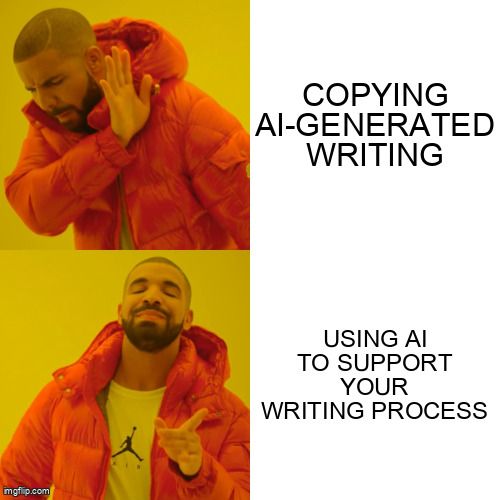
Important: AI should support your writing process — not replace your original thinking. 📌
Did you know?
Subscribe for more quick bites of learning delivered to your inbox.
Unsubscribe anytime. No spam. 🙂
3. Simplifying Research
In my experience, research can sometimes mean spending hours going through books, articles, and endless search results. AI tools can help make the process faster and more organized.

 Do's
Do's
Use AI to identify key ideas in long articles or PDFs
Compare information from multiple sources
Ask AI to generate research questions or keywords
Verify important information using trusted academic sources
 Don'ts
Rely only on AI summaries without reviewing the original source
Assume every AI-generated fact or citation is accurate
Use information from unreliable or outdated sources
Copy research information without understanding or reviewing it
Quiz: Who’s Using AI Effectively?

Four students are using AI while working on assignments:
Maya uses AI to simplify a difficult concept, compares the explanation with her class notes, and rewrites the idea in her own words.
Ethan uses AI-generated paragraphs to build most of his assignments and relies heavily on them while writing.
Sofia uses AI summaries to review key ideas before reading through her textbook notes.
Liam uses AI tools to improve grammar and sentence flow in his final draft.
Quiz
Which students are using AI effectively to support learning? Select all that apply:
4. Creative Studying

I also use AI in creative ways throughout my studies.
Try some of these ideas:
Create study schedules
Turn notes into flashcards
Ask AI to quiz you
Break large tasks into smaller goals
Generate practice questions
Create memory tricks to help remember information
These are some AI tools I’ve found helpful during my studies:
ChatGPT→ Brainstorming, quizzes, explanations
NotebookLM → Notes and study material
Perplexity AI → Research with linked sources
StudyFetch → Flashcards and study plans
These are just a few examples — there are many other AI tools out there to explore.
Take Action

Feeling more confident about using AI for learning?
Use this quick checklist to use AI to support your learning:
Want to learn more about using AI effectively? Explore these Bytes:
Pros and cons of using AI for education
Your feedback matters to us.
This Byte helped me better understand the topic.